User status
GET YOUR DEALS HERE LIMITED TIME OFFERS!
  • Please update your payment method to a card to enable the credit streak rewards.
  • We have a limited number of special packages per hour.

    Please check back in a few minutes or when you see this tab change color.

    Enjoy VIP treatment in chat rooms, discounts on products and unlimited access to your recorded shows.
    CREDITS
    credits FREE!
    VIP
    30 Day Membership
    Only 1 remaining!
    // VIP ONLY //
FREE CREDITS!
0
Create Free Account
CONGRATULATIONS!
LIFETIME STATUS INCREASED!
Your Status has moved up from “REGULAR” to ...
SUPERSTAR
X
CONGRATULATIONS!
CURRENT LEVEL INCREASED!
LEVEL
X
X
Free VOD Passes

You have free video passes available! Use them before they expire.

Redeem your pass during the video purchase process by selecting Free Pass.

Go to Videos now.

Processing your request ...
Please wait while we attempt to process your request.
X
Process Failed
We were unable to process your request. Please try again.

Forums / News & Announcements

Now Available: Our All-New Mobile Chat
More Actions

Add to List

X

Select a list to add

Item was successfully added to this list

No list available

Add to List
Add Reply
News & Announcements: Now Available: Our All-New Mobile Chat
Created by: vsgerry

3/18 @ 6:15pm (EDT) | UTC - 4:00
Posts: 1


We're excited to announce the official launch of our newly redesigned mobile chat experience, now available to everyone!
Built with your convenience in mind, this updated experience features a sleek, modern interface that makes chatting, tipping, and connecting easier and more enjoyable than ever before.
You'll have until March 30 to switch back to the previous version if you prefer. After that date, the new experience will become permanent for all users.
We encourage you to explore the new design and features—we think you'll love the improved speed, smoother navigation, and overall enhanced experience. If you have any feedback or run into any issues, we'd love to hear from you.

How Do I Try It?
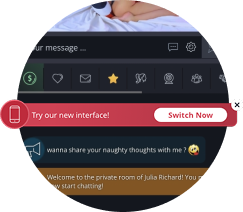
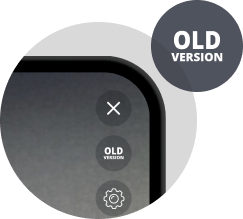
Tap the button in the settings menu or use the "TRY" banner in the current mobile interface to test it out.

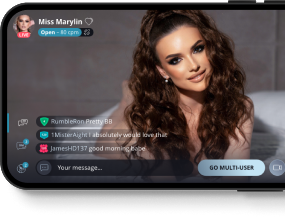
A Cleaner, More Immersive Experience
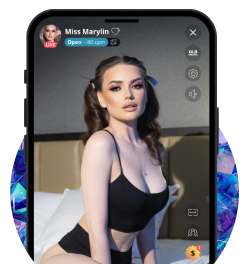
Our updated layout brings chat and video front and center with an edge-to-edge design. Panels slide in when you need them and can be dismissed with a simple drag from the top.

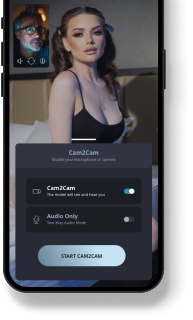
Cam2Cam, Simplified
A floating preview shows your cam live while you view the model, with easy one-tap controls to start or stop.

Faster Tipping
After tipping, a quick-access button lets you instantly resend your last tip without reopening the menu.


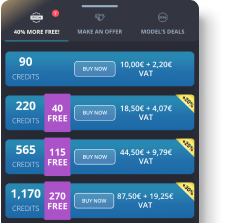
All Your Deals, One Place
Browse credit deals, model discounts, and private show offers in one easy-to-navigate panel. Switch between tabs and never miss a chance to save or send an enticing offer.

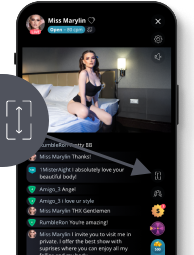
Flexible Video Viewing
Quickly switch between Full Screen and Full Width using the new on-screen icon—no need to dig through settings.

Want to Switch Back?
You can return to the previous mobile chat experience anytime before March 30. Just head to settings and select the option to switch back.
Quote
cockzilla4
Created by: cockzilla4

3/20 @ 7:08pm (EDT) | UTC - 4:00

Are there any plans to address all of the issues with the new mobile format before it becomes mandatory?
Quote
chris994
Created by: chris994

3/30 @ 10:57pm (EDT) | UTC - 4:00
Posts: 2

Will you guys be adding an option to do full screen on mobile again? I’m not talking about full screen but the chat is taking part of the screen, I’m talking full screen where the models video covers the entire phone screen like you can do on a laptop/desktop and can do on the old version.

Thank you
Quote
Created by: 640509040147

4/2 @ 7:54am (EDT) | UTC - 4:00
Location: NY
Posts: 1,273

I just want to know what was so wrong with the previous mobile version that this new mobile format had to be considered and now is apparently permanent?
Quote
cockzilla4
Created by: cockzilla4

4/3 @ 10:40am (EDT) | UTC - 4:00

Please at the very least make model chat blue again, its much more difficult to see when its the same color as everything else
Quote
frankwatcher
Created by: frankwatcher

4/3 @ 2:14pm (EDT) | UTC - 4:00
Location: United States
Posts: 1,236

Please at the very least make model chat blue again, its much more difficult to see when its the same color as everything else


I agree with this request. The model’s text gets lost now.
Quote

chris994
Created by: chris994

4/3 @ 2:43pm (EDT) | UTC - 4:00
Posts: 2

I just want to know what was so wrong with the previous mobile version that this new mobile format had to be considered and now is apparently permanent?


Would love an answer to this too, at least give people the option to use the old version. I never had any issues with the old version, the new mobile layout is really awful and the full screen feature missing is horrible
Quote

vsgrantdev
Created by: vsgrantdev

4/3 @ 4:38pm (EDT) | UTC - 4:00
Posts: 3

@chris994 @cockzilla4 @frankwatcher
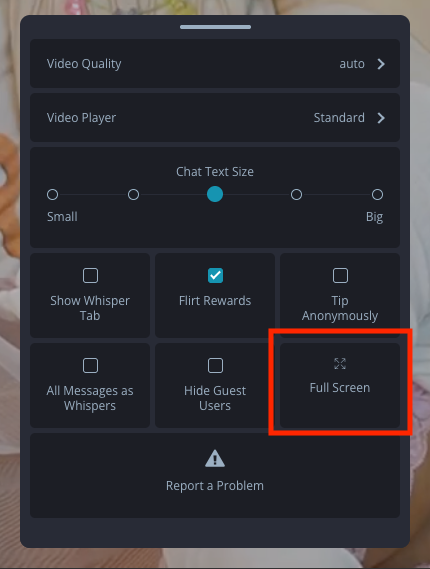
Appreciate your feedback! Good call on the model messages - we've updated these to the blue color so they will stand out better. Regarding the full screen option, there is an option for this in the settings menu (see screenshot below) which I think is what was being requested here. If not please let me know so we can further investigate. Thank you!

Quote
beemerjoy1
Created by: beemerjoy1

4/3 @ 11:05pm (EDT) | UTC - 4:00
Posts: 21

These are the questions I have so far:
What panels specifically slide in and out?
Where do we find the power boost option?
Where would we see the model's holiday gift counter?
Tks
Quote
cockzilla4
Created by: cockzilla4

4/4 @ 1:57pm (EDT) | UTC - 4:00

These are the questions I have so far:
What panels specifically slide in and out?
Where do we find the power boost option?
Where would we see the model's holiday gift counter?
Tks


you have to open up the tip menu to see the model's egg counter. not intuitive and not good design. it's also not clear that you have to swipe down to leave the tip menu without tipping
Quote
Vaginatarian@
Created by: vaginatarian@

4/6 @ 1:59am (EDT) | UTC - 4:00

Is there a way to start the cam without it pointing at your face like the other mobile app had? You could set it up away from you before going live
Quote
vsgrantdev
Created by: vsgrantdev

4/6 @ 6:29pm (EDT) | UTC - 4:00
Posts: 3

** REMOVED BY ADMINISTRATOR **
Quote
vsgrantdev
Created by: vsgrantdev

4/6 @ 6:34pm (EDT) | UTC - 4:00
Posts: 3

@beemerjoy1 All of the panels now slide in and out. There is a notch at the top of panels which you can use to swipe the panel down or you can click anywhere outside of the panel to dismiss it as well. We slightly updated the notch area to be more forgiving so the drag area is larger but does not disrupt the other elements in the panel. Let me know if this is working ok for you.

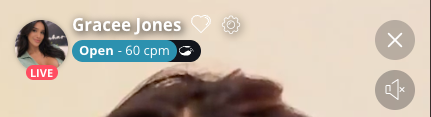
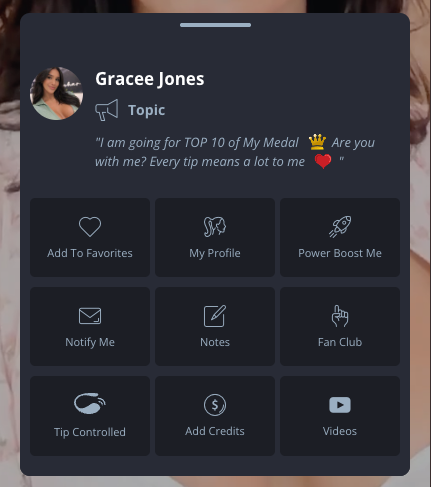
The models power boost option, along with other options, are located in a modal that appears when clicking on the models name or the models circle image. To further clarify this is the models name/image that appears in the top left corner of a chatroom. Below you will see a screenshot of the clickable area and then an example of what the panel with power boosting looks like.
Clickable Area Example:

Modal Example:


@beemerjoy1 @cockzilla4
Appreciate the feedback on the non-intuitive placement of the models holiday counter. We agree it should be easier to access, so for our next promo, Fiesta De Mayo, and all future promos, the holiday counter will be placed in the right-hand column of buttons.

@vaginatarian@ For now the camera will open by default to the front facing camera. In the old Cam2Cam design we did have the "test your webcam" section that allowed you to change your camera before going live, which I understand is a nice feature to have. I've noted this down as a possible addition to make in the future and will keep you posted if/when this does get added. Thanks for bringing it up!
Quote
mariodedaniela
Created by: mariodedaniela

4/9 @ 5:51am (EDT) | UTC - 4:00
Posts: 1

I preferred the other version. In this one, when I message the model(s), the chat covers the entire image; it overlaps the chat. And to top it all off, I didn't even try the new version. I've been using the old version since I arrived a year ago, and they switched me to the new version without my ask.ing. Besides, I already tried putting the phone face down with the screen on, and if you're one of those people who holds it by the edges of the screen, you end up accidentally tapping something you didn't mean to. And now it turns out you can't go back, and they made it perm.anent and for.ced because I didn't switch. They changed me without ask.ing my perm.ission or authori.zation, and I didn't ask to be switched. :mad
Quote
cockzilla4
Created by: cockzilla4

4/9 @ 3:46pm (EDT) | UTC - 4:00

I preferred the other version. In this one, when I message the model(s), the chat covers the entire image; it overlaps the chat. And to top it all off, I didn't even try the new version. I've been using the old version since I arrived a year ago, and they switched me to the new version without my ask.ing. Besides, I already tried putting the phone face down with the screen on, and if you're one of those people who holds it by the edges of the screen, you end up accidentally tapping something you didn't mean to. And now it turns out you can't go back, and they made it perm.anent and for.ced because I didn't switch. They changed me without ask.ing my perm.ission or authori.zation, and I didn't ask to be switched. :mad


The fact that typing in the chat interferes with the video feed from is by far the biggest issue with the new Interface, and I pointed this out in the forums immediately after the soft launch started for VIPs and it has not been addressed
Quote
soshyoldman
Created by: soshyoldman

8/18 @ 11:01am (EDT) | UTC - 4:00
Posts: 1

I use f4f on telephone. When i use the new interfase sometimes i can not see the model complate. Than i transfer to old situation. But that give a litte look. Is it possible to use fingers for making it greater or littler?
Quote
✕

Current Default Price:

50 Credits

Save

Model Messages

Your Screen Name:
Register to message
VIP credits: VIP members receive 100 bonus DM credits each month. These credits do not carry over to the following month.

Notification Settings

Open/close recents and search.

    Inbox

  • Sasha Elite
    2 h ago
    Lorem ipsum dolor sit amet dolor elips
    • Block The Model
    • Unblock The Model
    • Delete History
  • No results

    All Models

  • Sasha Elite
  • No results
    0 unread
    0 messages
  • Sasha Elite
    2 h ago
    Lorem ipsum dolor sit amet dolor elips
    • Block The Model
    • Unblock The Model
    • Delete History
  • Inbox is empty
  • No results
Reconnect

Connection Interrupted Try To Refresh The Page

Eva Sin Lorem ipsum dolor sit amet, consetetur sadipscing elitr, sed diam nonumy eirmod tempor invidunt ut labore et.
Johny123 Stet clita kasd gubergren, no sea takimata sanctus est.
— Admin Message — Stet clita kasd gubergren, no sea takimata sanctus est.
— AdBlock Detected — Attention AdBlock/AdBlock Plus User: There is a known compatibility issue between this adblocker and DM+ connections. If you cannot connect to DM+, we recommend disabling AdBlock/AdBlock Plus, or switching to an alternative ad blocker for an improved experience. Thank you for your cooperation!
— System Message — This model charges 10 credits. The model's has recently updated their pricing. Do you still want to send this message at this new price?
— Admin Message — Stet clita kasd gubergren, no sea takimata sanctus est. Try Again
Eva Sin
See Photo
Unlock Photo 10 Credits
Johny123
Eva Sin
Unlock Collection See Collection
Unlock Collection 10 Credits
Johny123
Eva Sin
See Video
Unlock Video 10 Credits
Johny123
Eva Sin
See Audio
Unlock Audio Message 10 Credits
Johny123
Reconnect

Connection Interrupted Try To Refresh The Page

Want more emojis?
  1. Click the "Send a message..." area
  2. Right-click current area
  3. Select "Emoji" or "Emoji & Symbols"
  1. Click the "Send a message..." area
  2. Open "Edit" menu
  3. Select "Emoji & Symbols" (^⌘SPACE)
This model charges 10 credits
Exciting New Feature! Share Video with the models you love!
Customer Service Help
Chat
Limited Time Offer! Don’t Miss Out! Last Chance!
240Free Credits
Tip models or start a private show
Play games like spin the wheel
Send DM’s to models, even if they are offline
Use credits to earn points for special rewards
Access group, members only, and party shows
10:00
Claim Your Bonus

ALERT: Upgrade your browser

We are no longer supporting this browser.

You are currently using Safari version 9 (2015) or earlier, which will have problems with our players. We will no longer be supporting Safari version 9, please upgrade to Chrome, Edge or FireFox. If you have further questions please see Customer Support.

You are currently using Internet Explorer 11 (2013) or earlier, which will have problems with our players. We will no longer be supporting Explorer 11, please upgrade to Chrome, Edge or FireFox If you have further questions please see Customer Support

CREDITS FREE
120

FREE CREDITS

Credits
VIP STATUS
Instant Full Access
Gold VIP Font
Up to 10 Reserved Nicknames
Email performers with attachments
Largest Private Video Preview
Turn Off Free Users Chat (No Gray Users)
Access to VIP Forums
Free Unlimited Access to Your Own Recorded Shows
Free 150 Daily Videos Available for 7 Days
Free 1 Hour Feature Shows and access to Archives
Free Access to Adult Star Video Archive
Free Access to Model Photo Galleries
VIP
30
Day
Membership
PLUS
150
CREDITS FREE!
PASS
90 CREDITS
FREE CREDITS
$10
120

FREE CREDITS

Change Product
Instant Full Access
Gold VIP Font
Up to 10 Reserved Nicknames
Email performers with attachments
Largest Private Video Preview
Turn Off Free Users Chat (No Gray Users)
Access to VIP Forums
Free Unlimited Access to Your Own Recorded Shows
Free 150 Daily Videos Available for 7 Days
Free 1 Hour Feature Shows and access to Archivess
Free Access to Adult Star Video Archive
Free Access to Model Photo Galleries
VIP 30 Days of Membership
30
Day
Membership
PLUS
150
CREDITS FREE!
$39.95*
Change Product
PASS
$39.95*
Change Product
Card Verification(CVV2)
The CVV2 number is a special number printed on your credit card and provides extra fraud protection.
Complete Purchase
Unlimited Free Chat Engage with models without time limits.
Emoticons in Chat Add fun to your conversations.
Favorite Models Keep track of your favorite performers.
Exclusive Forums Join and connect with the community.
Premium Models Chat with the world's hottest models.
Create Account
X
Suggested Usernames:
Generate random username
By signing up I confirm that I am 18-years old or older, that I have reviewed and agree with the Terms of Use and Privacy Policy, and agree to receive emails.
Unlimited Free Chat Engage with models without time limits.
Favorite Models Keep track of your favorite performers.
Premium Models Chat with the world's hottest models.
Emoticons in Chat Add fun to your conversations.
Exclusive Forums Join and connect with the community.
Choose Screen Name
X
:
Generate random username